Marketing Executive-നെ Hire ചെയ്യാതെ
WhatsApp AI Agent ഉപയോഗിച്ച് ബിസിനസ് വളർത്താം? 🤖
Small Business Owners-നുള്ള ഒരു Visual Free Guide
നിങ്ങളൊരു small business owner ആണോ? WhatsApp-ൽ വരുന്ന “stock ഉണ്ടോ?”, “price എത്രയാണ്?”, “timing എന്താണ്?” പോലുള്ള ചോദ്യങ്ങൾക്ക് ദിവസവും manually reply ചെയ്യുന്നത് സമയം തിന്നുന്ന ജോലിയാണ്. WhatsApp Business-ലുള്ള Meta Business Agent ഉപയോഗിച്ച് ഈ repetitive conversations-ന്റെ ഒരു ഭാഗം automate ചെയ്യാൻ കഴിയും.
പ്രധാന കുറിപ്പ്: Feature name, availability, eligibility, pricing എന്നിവ account, market, rollout എന്നിവ അനുസരിച്ച് മാറാം. നിങ്ങളുടെ WhatsApp Business app-ൽ option കാണുന്നുണ്ടെങ്കിൽ മാത്രമേ താഴെയുള്ള steps അതേപടി ലഭിക്കൂ.
ഒരു Marketing Executive-നെ വലിയ ശമ്പളത്തിൽ നിയമിക്കാതെ തന്നെ WhatsApp AI Agent ഉപയോഗിച്ച് നിങ്ങളുടെ ബിസിനസ്സ് വേഗത്തിൽ വളർത്താൻ സാധിക്കും. 24 മണിക്കൂറും നിങ്ങളുടെ ബിസിനസ്സിനായി പ്രവർത്തിക്കാൻ ഈ ടെക്നോളജിക്ക് കഴിയും.
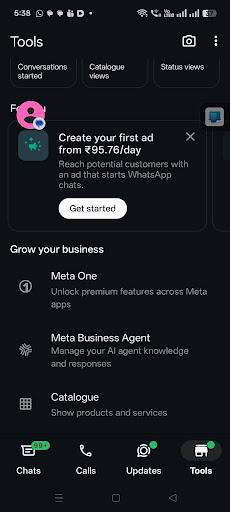
Step 1: WhatsApp Business-ൽ Tools തുറക്കുക
WhatsApp Business app തുറന്ന് താഴെയുള്ള navigation-ൽ Tools തുറക്കുക. ഇവിടെ business management, catalogue, ads, മറ്റ് growth tools എന്നിവ കാണാം.
Step 2: Meta Business AI Agent തിരഞ്ഞെടുക്കുക
Grow your business section-ൽ “Meta Business AI Agent” അല്ലെങ്കിൽ account-ൽ കാണുന്ന സമാന AI Agent option തിരഞ്ഞെടുക്കുക. ഇതാണ് നിങ്ങളുടെ business AI configure ചെയ്യാനുള്ള entry point.
Step 3: Your AI Agent screen തുറക്കുക
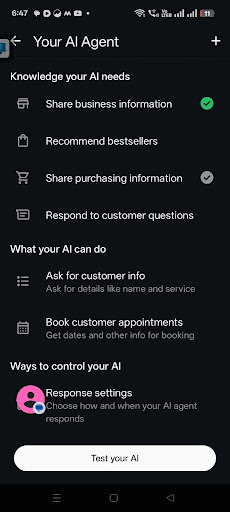
AI Agent തുറന്നാൽ business AI-യെ നിയന്ത്രിക്കാൻ വിവിധ options കാണാം. നിങ്ങളുടെ account-ൽ ലഭ്യമായ version അനുസരിച്ച് wording ചെറിയ തോതിൽ വ്യത്യാസപ്പെടാം.
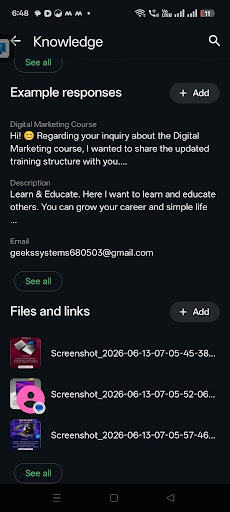
Step 4: Knowledge ചേർക്കുക 📚
Knowledge എന്നത് നിങ്ങളുടെ AI നിങ്ങളുടെ business-നെക്കുറിച്ച് എന്ത് അറിയണം എന്ന് തീരുമാനിക്കുന്ന ഭാഗമാണ്. ഇവിടെ example responses, business description, files, links, മറ്റ് useful information എന്നിവ ചേർക്കാൻ കഴിയും.
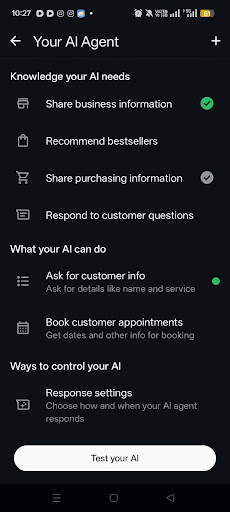
Step 5: Knowledge your AI needs 🧠
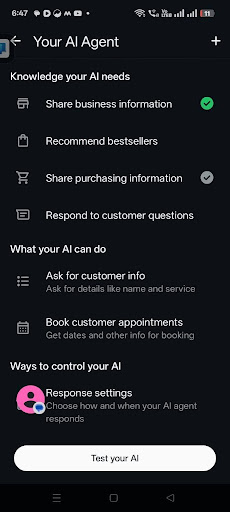
ഈ section-ൽ AI-യ്ക്ക് ആവശ്യമായ business context നൽകാം. Screenshot-ൽ കാണുന്ന പ്രധാന options:
- Share business information — business എന്താണ് ചെയ്യുന്നത്, location, working hours, services തുടങ്ങിയവ.
- Recommend bestsellers — popular products/services recommend ചെയ്യാൻ സഹായിക്കുന്ന വിവരങ്ങൾ.
- Share purchasing information — payment, purchase, delivery പോലുള്ള relevant information.
- Respond to customer questions — frequently asked questions-ന് consistent answers നൽകാൻ context.
AI-യ്ക്ക് എന്തൊക്കെ വിവരങ്ങൾ നൽകണം?
ഒരു AI Agent-നെ നല്ല രീതിയിൽ ഉപയോഗിക്കണമെങ്കിൽ vague information മതി എന്നില്ല. വ്യക്തമായ business data നൽകണം.
- Business name
- Products and services
- Location and service area
- Working hours
- Pricing or price ranges — regularly update ചെയ്യുക
- Popular products / bestsellers
- Delivery and payment information
- Frequently asked questions
- Policies and important limitations
Step 6: What your AI can do
നിങ്ങളുടെ account-ൽ ലഭ്യമായ capabilities അനുസരിച്ച് AI customer information ചോദിക്കാനും, products/services recommend ചെയ്യാനും, appointments അല്ലെങ്കിൽ customer queries കൈകാര്യം ചെയ്യാനും സഹായിക്കാം.
Step 7: Knowledge, Instructions & Response Settings ഉപയോഗിച്ച് നിയന്ത്രിക്കുക ⚙️
AI-യെ blind ആയി വിട്ടേക്കരുത്. Knowledge മാത്രം കൊടുത്താൽ പോര. AI എങ്ങനെ സംസാരിക്കണം, എന്ത് ചെയ്യണം, എന്ത് ചെയ്യരുത് എന്നതും വ്യക്തമായി define ചെയ്യുക.
ഒരു നല്ല Instruction ഉദാഹരണം
“You are the customer support assistant for Geeks Systems. Reply politely and clearly. Do not invent product prices, stock availability or repair costs. If you are unsure, ask the customer to contact our team or visit the shop for confirmation.”
Step 8: Test your AI 🧪
Setup കഴിഞ്ഞ ഉടൻ live ആക്കരുത്. ആദ്യം test ചെയ്യുക. ഒരു customer പോലെ ചോദ്യങ്ങൾ ചോദിക്കുക:
- Shop എവിടെയാണ്?
- Laptop repair ഉണ്ടോ?
- ഈ product stock ഉണ്ടോ?
- Price എത്രയാണ്?
- Sunday open ആണോ?
- Appointment book ചെയ്യാമോ?
AI തെറ്റായ വിവരങ്ങൾ നൽകുന്നുണ്ടെങ്കിൽ knowledge, instructions അല്ലെങ്കിൽ response settings update ചെയ്യുക.
Real-World Example
ഒരു customer damaged laptop hinge-ന്റെ photo അയച്ചാൽ, AI business context ഉപയോഗിച്ച് ഇത്തരത്തിലുള്ള initial response നൽകാൻ കഴിയും:
“It looks like your laptop hinge may be damaged. For an accurate assessment, please bring the device to our shop so our team can inspect it and advise you on the repair.”
Small Businesses-ന് ഇത് എങ്ങനെ സഹായിക്കും?
- Repetitive questions-ന് വേഗത്തിൽ response നൽകാൻ സഹായിക്കും.
- 24/7 initial customer assistance നൽകാൻ സഹായിക്കും.
- Customer information collect ചെയ്യാൻ സഹായിക്കും.
- Products/services recommend ചെയ്യാൻ സഹായിക്കും.
- Complex conversations മനുഷ്യൻ കൈകാര്യം ചെയ്യാൻ handoff ചെയ്യാം.
Brutal truth: AI Agent ഒരു Marketing Executive-നെ പൂർണമായും replace ചെയ്യില്ല. Strategy, content creation, campaign management, creative work, sales follow-up, analytics എന്നിവയ്ക്ക് മനുഷ്യന്റെ judgement ഇപ്പോഴും ആവശ്യമാണ്. പക്ഷേ repetitive WhatsApp queries കൈകാര്യം ചെയ്യുന്നതിലൂടെ staff സമയം ലാഭിക്കാൻ ഇത് സഹായിക്കും.
പക്ഷേ AI Agent മാത്രം മതിയോ?
ഇല്ല. AI ഒരു tool ആണ്. Business growth-ന് മുഴുവൻ digital system വേണം:
- Google Business Profile optimization
- Website / landing pages
- Clear CTAs
- SEO and AI visibility
- Consistent social media content
- WhatsApp lead flow
- Analytics and conversion tracking
- Ads and remarketing — ആവശ്യമായിടത്ത്
Digital Marketing with AI — 6 Month Complete Program 🚀
AI tools മാത്രം ഉപയോഗിക്കാൻ പഠിക്കുന്നത് പോര. അവയെ യഥാർത്ഥ business results-നായി ഉപയോഗിക്കാനാണ് പഠിക്കേണ്ടത്.
Program-ൽ ഉൾപ്പെടുന്നത്
- Complete LMS access with recorded lessons
- 18 live interactive sessions
- Practical assignments and projects
- Doubt-clearing and guidance
- Hands-on learning with real digital marketing and AI tools
- Project and portfolio development
Course Structure
- ആദ്യ 3 മാസം: 12 live sessions × 1 hour = 12 hours
- Internship / mentoring period: 6 live sessions × 1 hour = 6 hours
- ആകെ: 18 live interactive sessions
Course Fee
₹30,000
3 instalments ആയി ₹10,000 വീതം അടക്കാം.
Join ചെയ്യാൻ
Website: geeksglobaldigital.in
AI ഉപയോഗിക്കാൻ മാത്രം പഠിക്കരുത്.
AI ഉപയോഗിച്ച് business results ഉണ്ടാക്കാൻ പഠിക്കൂ.