
Google Business Profile എങ്ങനെ സൃഷ്ടിക്കാം? എങ്ങനെ Optimize ചെയ്യാം?
ഒരു business-ന് website മാത്രം ഉണ്ടായാൽ മതിയാകില്ല. നിങ്ങളുടെ business Google Search-ലും Google Maps-ലും മാത്രമല്ല, ആളുകൾ ഇന്ന് വിവരങ്ങൾ കണ്ടെത്താൻ ഉപയോഗിക്കുന്ന AI tools-ലും എളുപ്പത്തിൽ കണ്ടെത്താൻ കഴിയണം. പ്രത്യേകിച്ച് local businesses-ന്, Google Business Profile ശരിയായി create ചെയ്യുകയും optimize ചെയ്യുകയും ചെയ്യുന്നതിനൊപ്പം AI Search Visibility-യും ഉറപ്പാക്കുന്നത് കൂടുതൽ പ്രധാനപ്പെട്ടതായി മാറുകയാണ്.
നിങ്ങൾ ഒരു digital marketing institute, salon, clinic, restaurant, tuition centre, boutique, agency തുടങ്ങിയ local business നടത്തുകയാണെങ്കിൽ, Google Business Profile വഴി നിങ്ങളുടെ business-ന്റെ പേര്, address, phone number, website, working hours, photos, reviews തുടങ്ങിയ വിവരങ്ങൾ Google-ൽ പ്രദർശിപ്പിക്കാം.
Google Business Profile എങ്ങനെ Create ചെയ്യാം?
GBP create ചെയ്യുന്നത് വളരെ ബുദ്ധിമുട്ടുള്ള കാര്യമല്ല. എന്നാൽ ഓരോ information-ഉം ശരിയായി നൽകുന്നത് വളരെ പ്രധാനമാണ്.
Step 1: Google Business Profile തുറക്കുക
Google account ഉപയോഗിച്ച് Google Business Profile-ൽ sign in ചെയ്യുക.
നിങ്ങളുടെ business ഇതിനകം Google-ൽ ഉണ്ടോ എന്ന് ആദ്യം പരിശോധിക്കുക.
Business ഇല്ലെങ്കിൽ പുതിയ business profile create ചെയ്യാം.
Step 2: Business Name നൽകുക
നിങ്ങളുടെ business-ന്റെ യഥാർത്ഥ പേര് നൽകുക.
ഉദാഹരണം:
Geeks Global Digital Marketing Training Institute
Business name-ൽ unnecessary keywords ചേർക്കുന്നത് ഒഴിവാക്കുക.
ഉദാഹരണത്തിന്:
❌ Geeks Global Best Digital Marketing Institute Kunnamkulam
എന്നതിന് പകരം:
✅ Geeks Global Digital Marketing Training Institute
എന്നതാണ് ശരിയായ രീതിയിലുള്ള business name.
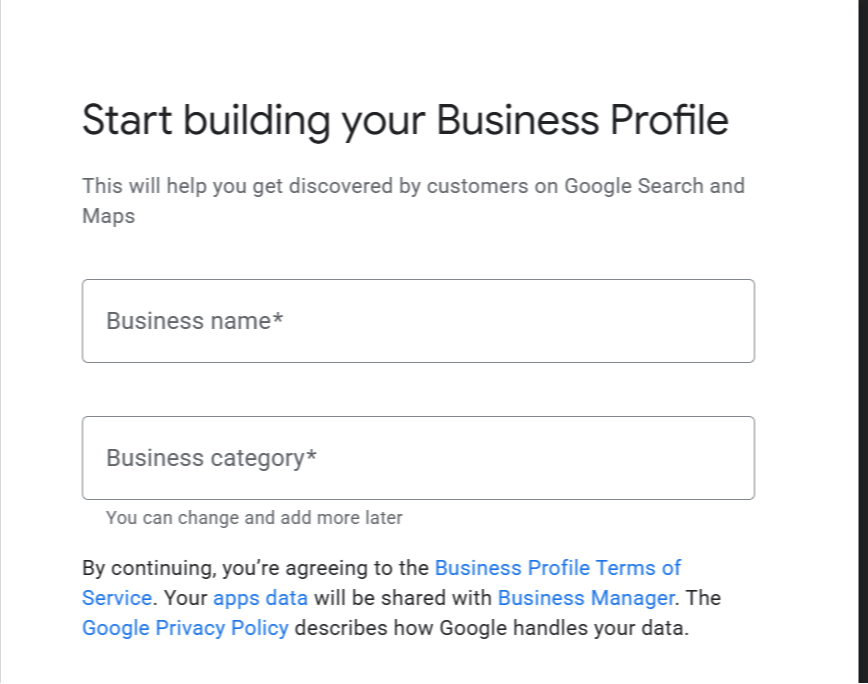
Step 3: Business Category തിരഞ്ഞെടുക്കുക
നിങ്ങളുടെ business-ന് ഏറ്റവും അനുയോജ്യമായ primary category തിരഞ്ഞെടുക്കുക.
ഒരു digital marketing institute ആണെങ്കിൽ, ലഭ്യമായ options-ൽ ഏറ്റവും relevant ആയ category തിരഞ്ഞെടുക്കണം.
Primary category നിങ്ങളുടെ business എന്താണ് ചെയ്യുന്നതെന്ന് Google-ന് മനസ്സിലാക്കാൻ സഹായിക്കും.
Step 4: Business Location നൽകുക
Customers നിങ്ങളുടെ business location-ൽ നേരിട്ട് എത്തുന്ന business ആണെങ്കിൽ address നൽകുക.
ഉദാഹരണത്തിന്:
Kunnamkulam, Kerala
എന്ന രീതിയിൽ location information നൽകാം.
Address നൽകുമ്പോൾ spelling, PIN code തുടങ്ങിയ വിവരങ്ങൾ കൃത്യമായിരിക്കണം.
Step 5: Phone Number & Website Add ചെയ്യുക
Customers-ന് നിങ്ങളെ contact ചെയ്യാൻ കഴിയുന്ന phone number നൽകുക.
Website ഉണ്ടെങ്കിൽ website URL-ഉം ചേർക്കുക.
ഇവ രണ്ടും local customers-ന് വളരെ useful ആണ്.
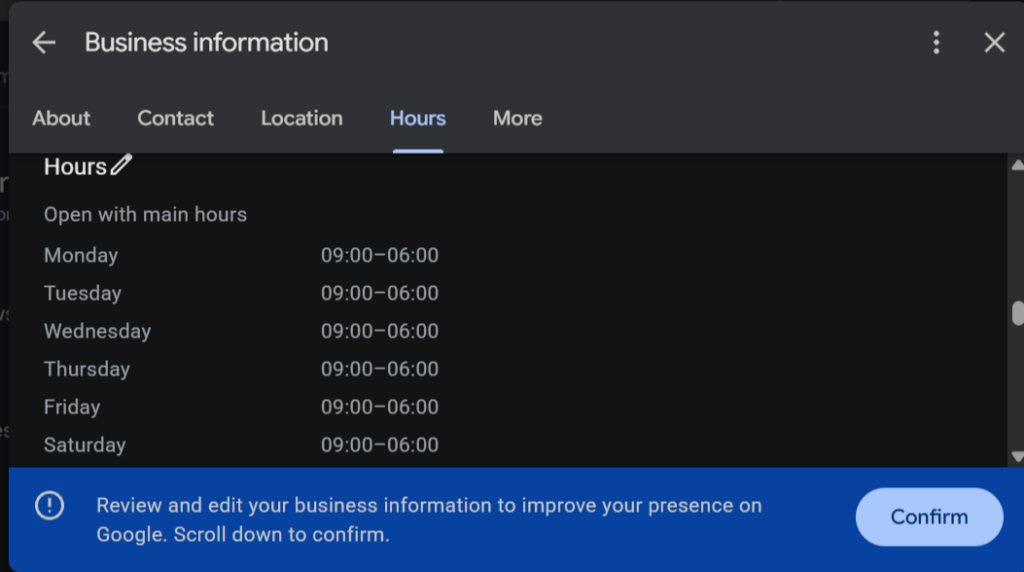
Step 6: Business Hours Add ചെയ്യുക
നിങ്ങളുടെ business തുറക്കുന്ന സമയവും അടയ്ക്കുന്ന സമയവും നൽകുക.
ഉദാഹരണം:
Monday – Saturday: 9:00 AM – 6:00 PM
Business hours യഥാർത്ഥ സമയവുമായി match ചെയ്യണം.
Step 7: Photos Upload ചെയ്യുക
നിങ്ങളുടെ business-നെ represent ചെയ്യുന്ന high-quality photos upload ചെയ്യുക.
ഉദാഹരണത്തിന്:
- Logo
- Institute exterior
- Classroom
- Training sessions
- Mentor photos
- Students
- Certificates
- Events
- Office interior
Regular ആയി പുതിയ photos upload ചെയ്യുന്നത് profile-നെ കൂടുതൽ active ആക്കാൻ സഹായിക്കും.
Step 8: Verification Complete ചെയ്യുക
Google ആവശ്യപ്പെടുന്ന verification process complete ചെയ്യുക.
Verification method business-ന്റെ സാഹചര്യത്തിനനുസരിച്ച് വ്യത്യാസപ്പെടാം.
Verification പൂർത്തിയാക്കിയതിന് ശേഷം നിങ്ങളുടെ profile manage ചെയ്യാൻ സാധിക്കും.
Google Business Profile Create ചെയ്താൽ മാത്രം മതിയോ?
ഇല്ല.
GBP create ചെയ്യുന്നത് ആദ്യ ഘട്ടം മാത്രമാണ്.
ഒരു profile create ചെയ്ത ശേഷം അതിലെ information optimize ചെയ്യുന്നതും വളരെ പ്രധാനമാണ്.
ഇവിടെയാണ് GMB Everywhere,GMB Crush ,pleper പോലുള്ള tools സഹായിക്കുന്നത്.
GBP എങ്ങനെ Optimize ചെയ്യാം?
Optimization ചെയ്യുന്നതിനായി നിരവധി Chrome Extensions ലഭ്യമാണ്. അവ ഉപയോഗിക്കുന്നതിന് ആദ്യം Chrome Extension ഇൻസ്റ്റാൾ ചെയ്യണം.
Chrome Extension എങ്ങനെ ഇൻസ്റ്റാൾ ചെയ്യാം എന്ന് അറിയാൻ ഈ വീഡിയോ കാണുക.
മുകളിൽ നൽകിയ വീഡിയോയിൽ Chrome Extension എങ്ങനെ ഇൻസ്റ്റാൾ ചെയ്യാം എന്ന് കണ്ടല്ലോ.
Google Business Profile optimization-നായി പല Chrome Extensions-ുകളും tools-ുകളും ലഭ്യമാണ്. അതിൽ GMB Everywhere ഉപയോഗിച്ച് competitor Google Business Profiles analyse ചെയ്യാനും, അവരുടെ പ്രധാന ബിസിനസ് വിഭാഗം, services, reviews, ratings, working hours തുടങ്ങിയ കാര്യങ്ങൾ മനസ്സിലാക്കാനും കഴിയും.
ഉദാഹരണത്തിന്, നിങ്ങൾ “Digital Marketing Institute Kunnamkulam” എന്ന keyword target ചെയ്യുന്നുവെങ്കിൽ, Google-ൽ ഈ keyword search ചെയ്ത് വരുന്ന top competitors-ന്റെ profiles GMB Everywhere ഉപയോഗിച്ച് analyse ചെയ്യാം.
ഇത് ഒരു tool എങ്ങനെ ഉപയോഗിക്കാം എന്നത് പഠിക്കുന്നതിലുപരി, ഒരു business-ന്റെ online presence എങ്ങനെ analyse ചെയ്യണം, optimize ചെയ്യണം, customers-നെ എങ്ങനെ എത്തിക്കണം എന്നതിന്റെ practical understanding നൽകുന്നു.
പക്ഷേ ഇവിടെ ഒരു ചോദ്യം:
ഒരു Chrome Extension അല്ലെങ്കിൽ ഒരു AI Tool മാത്രം പഠിച്ചാൽ മതിയോ?
ഇല്ല.
GMB Everywhere ഒരു tool മാത്രമാണ്. AI-യും ഒരു tool മാത്രമാണ്. യഥാർത്ഥ business growth നേടണമെങ്കിൽ ഇവയെ SEO, website, social media, lead generation, analytics, advertising തുടങ്ങിയ digital marketing strategies-നൊപ്പം ഉപയോഗിക്കാൻ പഠിക്കണം.
അതിനാലാണ് Digital Marketing with AI — 6 Month Complete Program.
Digital Marketing with AI — 6 Month Complete Program 🚀
AI tools മാത്രം ഉപയോഗിക്കാൻ പഠിക്കുന്നത് പോര. അവയെ യഥാർത്ഥ business results-നായി ഉപയോഗിക്കാനാണ് പഠിക്കേണ്ടത്.
Program-ൽ ഉൾപ്പെടുന്നത്
- Complete LMS access with recorded lessons
- 18 live interactive sessions
- Practical assignments and projects
- Doubt-clearing and guidance
- Hands-on learning with real digital marketing and AI tools
- Project and portfolio development
Course Structure
- ആദ്യ 3 മാസം: 12 live sessions × 1 hour = 12 hours
- Internship / mentoring period: 6 live sessions × 1 hour = 6 hours
- ആകെ: 18 live interactive sessions
Course Fee
₹30,000
3 instalments ആയി ₹10,000 വീതം അടക്കാം.
Join ചെയ്യാൻ
Website: geeksglobaldigital.in
LMS: lms.geeksglobaldigital.in
ഇനി Practical ആയി GMB Everywhere ഉപയോഗിക്കാം 🚀
മുകളിൽ പറഞ്ഞതുപോലെ, GMB Everywhere ഒരു tool മാത്രമാണ്. എന്നാൽ ഒരു digital marketer എന്ന നിലയിൽ ഒരു tool എങ്ങനെ ശരിയായി ഉപയോഗിക്കണം എന്നത് പഠിക്കുന്നത് വളരെ പ്രധാനമാണ്.
നമ്മുടെ Digital Marketing with AI — 6 Month Complete Program-ൽ ഇത്തരം digital marketing tools practical ആയി ഉപയോഗിച്ച് പഠിക്കുന്നതിനാണ് പ്രാധാന്യം നൽകുന്നത്.
അപ്പോൾ ഇനി GMB Everywhere എങ്ങനെ install ചെയ്യാം, Google Business Profile optimization-നായി അത് എങ്ങനെ ഉപയോഗിക്കാം എന്ന് step-by-step ആയി നോക്കാം.
Step 1: GMB Everywhere Install ചെയ്യുക
Browser-ൽ GMB Everywhere extension install ചെയ്യുക.
Install ചെയ്ത ശേഷം Google Search അല്ലെങ്കിൽ Google Maps തുറക്കുക.
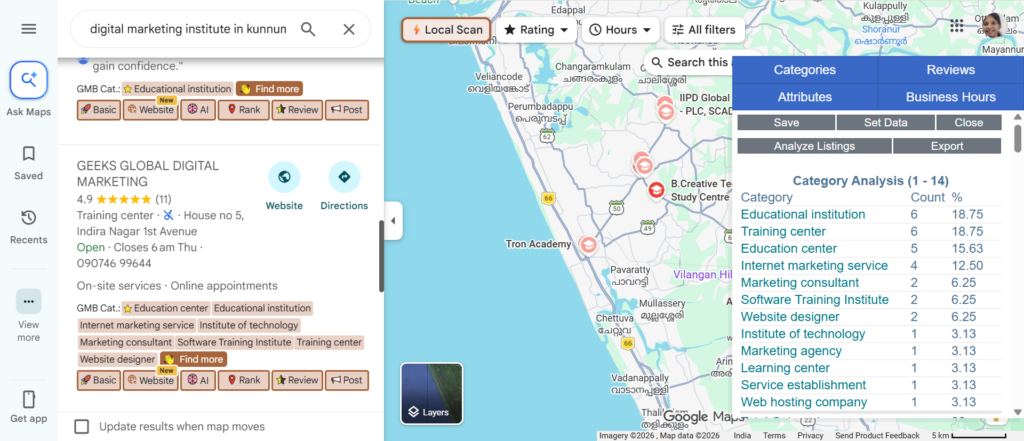
Step 2: നിങ്ങളുടെ Target Keyword Search ചെയ്യുക
നിങ്ങളുടെ business-ന് relevant ആയ local keyword Google-ൽ search ചെയ്യുക.
ഉദാഹരണം:
“digital marketing institute Kunnamkulam”
ഇതാണ് നമ്മുടെ example keyword.
ഇതിലൂടെ Kunnamkulam area-യിലെ relevant Google Business Profiles കണ്ടെത്താം.
Step 3: Top Competitors Identify ചെയ്യുക
Search results-ൽ വരുന്ന top businesses ശ്രദ്ധിക്കുക.
ഉദാഹരണത്തിന്, നിങ്ങളുടെ business digital marketing training institute ആണെങ്കിൽ:
Digital Marketing Institute Kunnamkulam
എന്ന keyword search ചെയ്യാം.
Top results-ൽ വരുന്ന competitors-ന്റെ profiles analyze ചെയ്യുക.
ഇവിടെ ഒരു പ്രധാന കാര്യം ശ്രദ്ധിക്കുക:
Competitor-ന്റെ business name copy ചെയ്യരുത്.
അവരുടെ strategy മനസ്സിലാക്കുകയാണ് ലക്ഷ്യം.
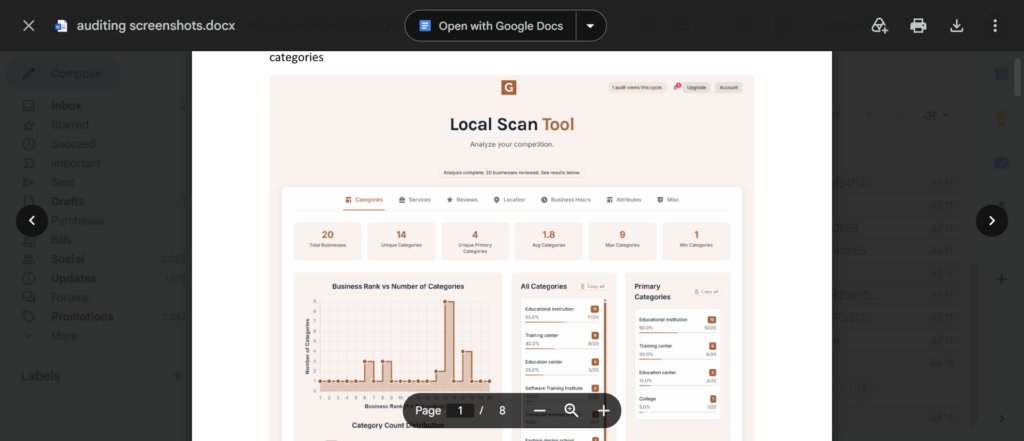
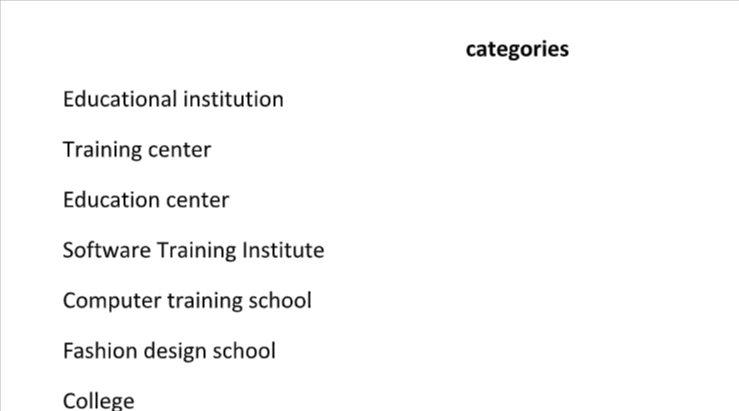
Step 4: Competitor Categories പരിശോധിക്കുക
GMB Everywhere ഉപയോഗിച്ച് competitors ഉപയോഗിക്കുന്ന business categories പരിശോധിക്കുക.
ഉദാഹരണം:
ഒരു competitor-ന്റെ primary category digital marketing training-നോട് ബന്ധപ്പെട്ടതാണെങ്കിൽ, നിങ്ങളുടെ business-നും ലഭ്യമായ ഏറ്റവും relevant category തിരഞ്ഞെടുക്കുന്നുണ്ടോ എന്ന് പരിശോധിക്കുക.
Category selection local SEO-യിൽ പ്രധാനപ്പെട്ടതാണ്.
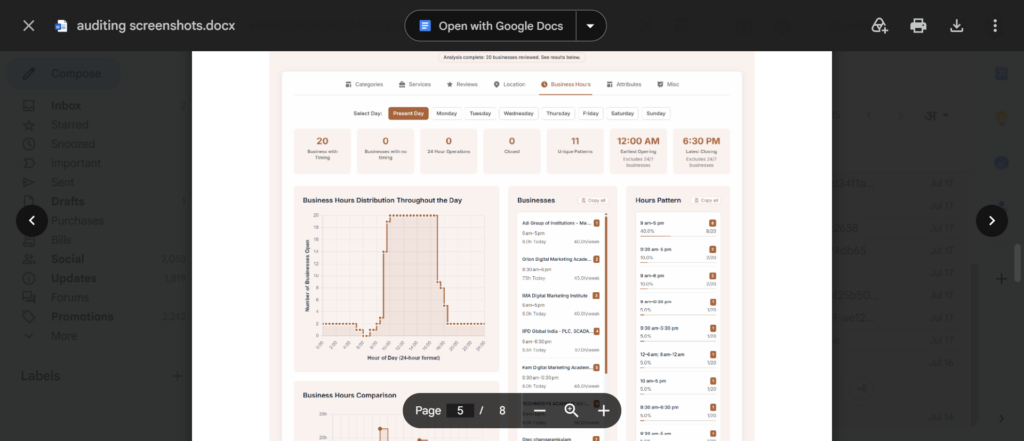
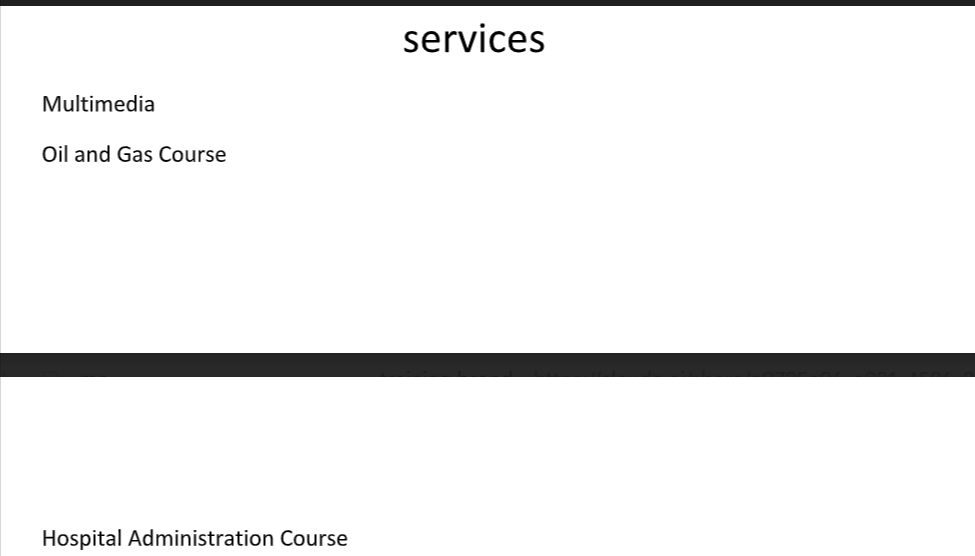
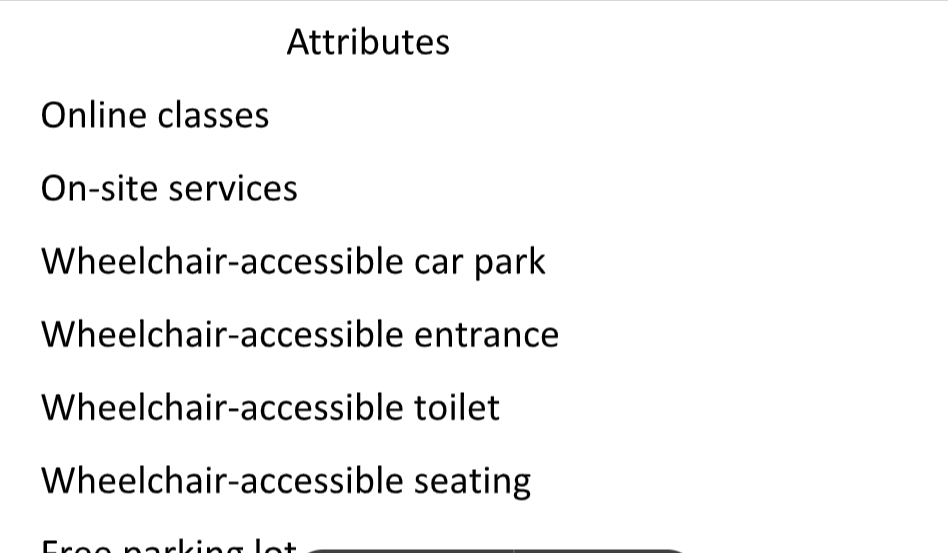
- Primary Category → പ്രധാന വിഭാഗം
- Competitors-ന്റെ Service Analyse ചെയ്യുക → മത്സരിക്കുന്ന ബിസിനസുകളുടെ സേവനങ്ങൾ വിശകലനം ചെയ്യുക
- Working Hours → പ്രവർത്തന സമയം / പ്രവർത്തിക്കുന്ന സമയം
Step 5: Reviews Analyze ചെയ്യുക
Competitors-ന്റെ reviews ശ്രദ്ധിക്കുക.
Customers എന്താണ് പറയുന്നത്?
ഉദാഹരണത്തിന് reviews-ൽ ഇത്തരം phrases ആവർത്തിച്ച് വരാം:
- Practical digital marketing training
- AI tools
- SEO training
- Experienced trainers
- Job-oriented training
- Kunnamkulam digital marketing course
ഇവ customers യഥാർത്ഥത്തിൽ value ചെയ്യുന്ന കാര്യങ്ങളെക്കുറിച്ച് insight നൽകും.
Reviews copy ചെയ്യരുത്.
പകരം customers പറയുന്ന common topics മനസ്സിലാക്കി നിങ്ങളുടെ services, website content, GBP description എന്നിവ മെച്ചപ്പെടുത്താം.
Step 6: Services Optimize ചെയ്യുക
നിങ്ങളുടെ GBP-ൽ ലഭ്യമായ services section ശരിയായി ഉപയോഗിക്കുക.
ഒരു digital marketing institute-ന് ഉദാഹരണമായി:
- Digital Marketing Training
- SEO Training
- Social Media Marketing
- Google Ads Training
- Content Marketing
- Email Marketing
- AI Marketing Training
- Website Development Training
എന്നിവ relevant ആണെങ്കിൽ services ആയി ചേർക്കാം.
നിങ്ങളുടെ business യഥാർത്ഥത്തിൽ നൽകുന്ന services മാത്രം ചേർക്കുക.
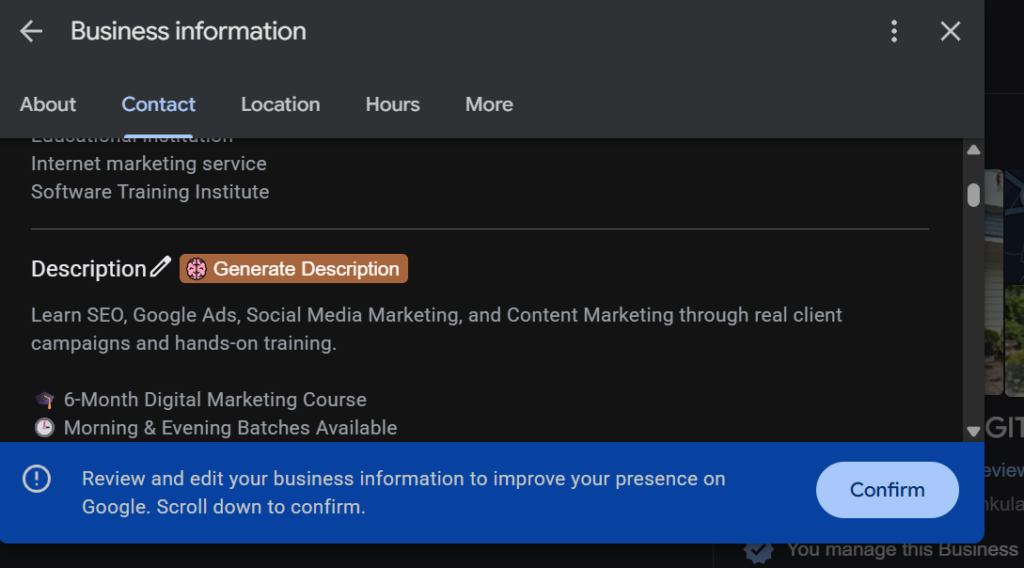
Step 7: Business Description Optimize ചെയ്യുക
Business description എഴുതുമ്പോൾ നിങ്ങളുടെ business എന്താണ് ചെയ്യുന്നത്, എവിടെയാണ് പ്രവർത്തിക്കുന്നത്, ആരെയാണ് target ചെയ്യുന്നത് തുടങ്ങിയ കാര്യങ്ങൾ സ്വാഭാവികമായി ഉൾപ്പെടുത്താം.
Example:
Geeks Global Digital Marketing Training Institute provides practical digital marketing training for students, business owners and aspiring digital marketers. Our training covers SEO, social media marketing, Google Ads, content marketing and AI-powered digital marketing strategies. We help learners build practical skills through real-world projects and industry-focused training in Kunnamkulam, Kerala.
ഇതിന്റെ മലയാളത്തിലുള്ള ആശയം:
Kunnamkulam, Kerala-യിൽ students, business owners, aspiring digital marketers എന്നിവർക്കായി practical digital marketing training നൽകുന്ന സ്ഥാപനമാണ് Geeks Global Digital Marketing Training Institute. SEO, Social Media Marketing, Google Ads, Content Marketing, AI-powered Digital Marketing തുടങ്ങിയ മേഖലകളിൽ practical training നൽകുന്നു.
Keyword കൃത്രിമമായി ആവർത്തിക്കുന്നതിന് പകരം natural ആയി ഉപയോഗിക്കുകയാണ് നല്ലത്.
Step 8: NAP Information Consistent ആക്കുക
Local SEO-യിൽ NAP എന്നത്:
N – Name
A – Address
P – Phone Number
എന്നതാണ്.
നിങ്ങളുടെ website, Google Business Profile, social media profiles, business directories തുടങ്ങിയ ഇടങ്ങളിൽ business name, address, phone number എന്നിവ കഴിയുന്നത്ര consistent ആയിരിക്കണം.
ഉദാഹരണത്തിന്:
Business Name: Geeks Global Digital Marketing Training Institute
Location: Kunnamkulam, Kerala
Phone: നിങ്ങളുടെ business phone number
ഒരു website-ൽ ഒരു രീതിയിലും മറ്റൊരു directory-ൽ മറ്റൊരു രീതിയിലും information നൽകുന്നത് ഒഴിവാക്കുക.
Step 9: Google Posts ഉപയോഗിക്കുക
GBP optimize ചെയ്ത ശേഷം profile active ആയി നിലനിർത്താനും Google Posts ഉപയോഗിക്കാം.
ഉദാഹരണത്തിന്:
New Digital Marketing Batch Starting in Kunnamkulam
അല്ലെങ്കിൽ
Practical SEO Training for Beginners
അല്ലെങ്കിൽ
AI-Powered Digital Marketing Workshop
എന്നിങ്ങനെ business-നോട് relevant ആയ updates publish ചെയ്യാം.
Step 10: Customer Reviews നേടുക
Positive customer reviews local business-ന് വളരെ valuable ആണ്.
Course complete ചെയ്ത students, customers തുടങ്ങിയവരോട് genuine feedback നൽകാൻ ആവശ്യപ്പെടാം.
ഉദാഹരണത്തിന്:
“Digital marketing training-ൽ നിങ്ങൾക്ക് ഏറ്റവും useful ആയത് എന്തായിരുന്നു?”
എന്ന രീതിയിൽ genuine feedback ചോദിക്കാം.
Fake reviews വാങ്ങുകയോ എഴുതുകയോ ചെയ്യരുത്.
“Digital Marketing Institute Kunnamkulam” – ഒരു Practical Example
നിങ്ങൾ Kunnamkulam-ൽ ഒരു digital marketing institute നടത്തുന്നു എന്ന് കരുതുക.
നിങ്ങളുടെ target keyword:
Digital Marketing Institute Kunnamkulam
ആദ്യം:
Google-ൽ keyword search ചെയ്യുക.
പിന്നീട്:
GMB Everywhere ഉപയോഗിച്ച് top-ranking profiles പരിശോധിക്കുക.
Analyze ചെയ്യേണ്ട കാര്യങ്ങൾ:
- Primary category എന്താണ്?
- Secondary categories ഉണ്ടോ?
- എത്ര reviews ഉണ്ട്?
- Rating എത്രയാണ്?
- ഏത് services ആണ് നൽകുന്നത്?
- എത്ര photos upload ചെയ്തിട്ടുണ്ട്?
- Google Posts ഉപയോഗിക്കുന്നുണ്ടോ?
- Business description എങ്ങനെയാണ് എഴുതിയിരിക്കുന്നത്?
- Website link നൽകിയിട്ടുണ്ടോ?
- Competitors-ന്റെ common strengths എന്തൊക്കെയാണ്?
ഇവയെല്ലാം പഠിച്ച ശേഷം നിങ്ങളുടെ GBP കൂടുതൽ complete ആക്കാം.
ഒരു പ്രധാന കാര്യം: Keyword Stuffing ഒഴിവാക്കുക
Local SEO ചെയ്യുമ്പോൾ പലരും ചെയ്യുന്ന ഒരു mistake ആണ് business name-ലും description-ലും keyword അമിതമായി ചേർക്കുന്നത്.
ഉദാഹരണം:
❌ Best Digital Marketing Institute Kunnamkulam | Digital Marketing Course Kunnamkulam | SEO Training Kunnamkulam
ഇത് professional ആയി തോന്നില്ല.
പകരം:
✅ Geeks Global Digital Marketing Training Institute
എന്ന യഥാർത്ഥ business name ഉപയോഗിക്കുകയും description, services, website content തുടങ്ങിയ relevant areas-ൽ keywords natural ആയി ഉപയോഗിക്കുകയും ചെയ്യുക.
GBP Optimization ഒരു One-Time Process അല്ല
Google Business Profile create ചെയ്ത് information add ചെയ്താൽ ജോലി കഴിഞ്ഞു എന്ന് കരുതരുത്.
Regular ആയി:
- Photos update ചെയ്യുക
- Posts publish ചെയ്യുക
- Customer reviews-ന് reply നൽകുക
- Business information പരിശോധിക്കുക
- Services update ചെയ്യുക
- Competitors monitor ചെയ്യുക
- Local keywords analyze ചെയ്യുക
എന്നിവ ചെയ്യുന്നത് നല്ലതാണ്.
Conclusion
ഒരു local business-ന് online visibility വർധിപ്പിക്കാൻ Google Business Profile വളരെ പ്രധാനപ്പെട്ട ഒരു tool ആണ്.
GBP create ചെയ്യുന്നത് ആദ്യ ഘട്ടമാണ്. അതിനുശേഷം profile-ലെ business information, categories, services, photos, reviews, posts തുടങ്ങിയവ ശരിയായി optimize ചെയ്യണം.
അതോടൊപ്പം GMB Everywhere പോലുള്ള tools ഉപയോഗിച്ച് competitors-നെ analyze ചെയ്യുന്നത് local SEO strategy കൂടുതൽ മികച്ചതാക്കാൻ സഹായിക്കും.
ഉദാഹരണത്തിന് “digital marketing institute Kunnamkulam” പോലുള്ള ഒരു local keyword target ചെയ്യുമ്പോൾ, top competitors എന്താണ് ചെയ്യുന്നത് എന്ന് മനസ്സിലാക്കി നിങ്ങളുടെ own GBP കൂടുതൽ complete, relevant, trustworthy ആക്കുക എന്നതാണ് പ്രധാന ലക്ഷ്യം.
Create → Verify → Optimize → Analyze → Improve
ഈ process തുടർച്ചയായി follow ചെയ്താൽ നിങ്ങളുടെ Google Business Profile കൂടുതൽ professional ആയും local customers-ന് കൂടുതൽ useful ആയും മാറ്റാൻ കഴിയും.